

Filet mignon and the rise of smart grills
Filet mignon is the most tender cut you can buy, but it's easy to ruin. Because it's so lean, the window between a perfect medium-rare and a dry, gray mess is tiny. Most of us rely on a cheap meat thermometer and a bit of luck to get the sear right without overcooking the middle.
Now, a new generation of grills is promising to take the guesswork out of the equation: smart grills. These aren’t your father’s charcoal kettles. They incorporate sensors, sophisticated algorithms, and even artificial intelligence to monitor and adjust cooking conditions in real-time. The idea is simple – consistent, perfectly cooked results every time, even for a notoriously difficult cut like filet mignon.
The technology isn’t about replacing the skill of a grill master, but rather augmenting it. Early smart grills focused on basic temperature control, but newer models are capable of much more. They can track internal meat temperature, ambient grill temperature, and even humidity. This data is then fed into an AI system that adjusts burners or heating elements to maintain the desired cook. The promise is a steak cooked exactly to your preference, without the constant worry.
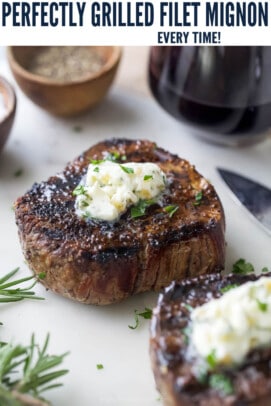
Defining doneness
Doneness is just a measure of internal temperature. Rare sits between 125-130°F with a cool red center. Medium-rare, the standard for most steakhouse fans, hits between 130-140°F.
Medium is 140-150°F, showing a warm pink center. If you go above 160°F, the steak is well-done and likely quite tough. Use a digital thermometer to be sure; guessing by touch is unreliable.
However, don't pull that filet mignon off the grill the instant it hits your target temperature. Carryover cooking is a phenomenon where the steak continues to cook internally even after being removed from the heat source. The residual heat will raise the temperature by 5-10°F, so account for that. For example, if you want medium-rare (130-140°F), pull it off around 125°F. Ultimately, personal preference is key. What one person considers perfect, another might find over or undercooked.
How smart grills actually work
So, what exactly makes a grill "smart"? The core of the technology lies in its sensors. Most smart grills use a combination of temperature probes – often inserted directly into the meat – and infrared sensors that measure the surface temperature of the grill grates. Some even incorporate humidity sensors to monitor the moisture levels around the steak.
This data is then processed by a computer. In some grills, the processing happens onboard, with pre-programmed profiles for different types of meat and desired doneness levels. The grill then automatically adjusts the burners to maintain the optimal cooking conditions. However, a growing number of smart grills are cloud-connected, sending data to a server for more complex analysis.
That's where the AI comes in. The cloud-based systems can leverage machine learning to improve cooking accuracy over time. They can analyze data from thousands of cooks to identify patterns and refine their algorithms. It's not yet widespread, but some grills are starting to offer features like predictive cooking, which adjusts cooking times based on factors like steak thickness, ambient temperature, and even the initial temperature of the meat. The sophistication varies; some systems are essentially sophisticated timers, while others are actively learning and adapting.
- Internal probes that track the meat's core temperature in real-time.
- Infrared Sensors: Measure grill grate temperature.
- Humidity Sensors: Monitor moisture levels.
Grilling Filet Mignon: A Step-by-Step AI Guide
Let's assume you have a smart grill equipped with a temperature probe and cloud connectivity. First, prep your filet mignon. Pat the steaks dry with paper towels – this is crucial for achieving a good sear. Season generously with salt and pepper, or your preferred steak rub. A simple blend of kosher salt, cracked black pepper, and garlic powder works wonderfully.
Insert the temperature probe into the thickest part of the steak, ensuring it doesn’t touch any bone. Place the steak on the preheated grill. The smart grill will ask you to select the desired doneness level. Choose your preference (rare, medium-rare, etc.). The grill will then automatically adjust the burners to maintain the optimal cooking temperature.
For medium-rare (130-140°F), expect a cooking time of around 6-8 minutes per side, depending on the thickness of the steak and the grill's power. The smart grill will alert you when the steak reaches your target temperature. Remember to account for carryover cooking – remove the steak from the grill when it’s about 5-10°F below your desired final temperature.
Once removed, let the steak rest for 5-10 minutes before slicing. This allows the juices to redistribute, resulting in a more tender and flavorful steak. The smart grill may even guide you through the resting process, providing a countdown timer. Slicing against the grain will further enhance tenderness. Enjoy!
When the tech fails
Even with all the technology in the world, things can occasionally go wrong. A malfunctioning temperature probe can provide inaccurate readings, leading to an undercooked or overcooked steak. If you suspect a problem, double-check the reading with an independent instant-read thermometer. It's always good to have a backup.
Sometimes, the AI may underestimate the cooking time, particularly with thicker cuts of meat. If the steak isn’t reaching the desired temperature, manually increase the cooking time or adjust the grill’s settings. Don't be afraid to override the AI if your instincts tell you something is off. After all, you're still the grill master.
If the steak is searing too quickly, lower the grill's temperature or move the steak to a cooler zone. Conversely, if it's not searing enough, increase the temperature or move it closer to the heat source. Remember, human judgment is still essential. Smart grills are tools, not replacements for skill and common sense.
Smart Grill Comparison: Standout Models
The smart grill market is rapidly evolving, but a few models consistently stand out. The Weber Smoke+ Grill (around $499) offers a solid combination of features, including a built-in thermometer and Wi-Fi connectivity. It’s known for its ease of use and reliable performance. However, it lacks some of the more advanced AI capabilities of other models.
The Traeger Ironwood 885 (approximately $1,799) is a premium option with advanced temperature control and a robust app. It boasts a sophisticated algorithm that learns from your cooking habits and automatically adjusts settings. It’s a great choice for serious grillers who want the ultimate in precision.
Finally, the Masterbuilt Gravity 560 (around $349) is a more affordable option that still offers smart features like digital temperature control and a meat probe. It’s a good entry point for those who are curious about smart grilling but don’t want to break the bank. Each grill represents a different balance of price, features, and performance.
- The Weber Smoke+ Grill costs $499 and is a reliable entry point for Wi-Fi connectivity.
- Traeger Ironwood 885: $1,799, Advanced temperature control, learning algorithm.
- Masterbuilt Gravity 560: $349, Affordable, digital temperature control.
Smart Grill Comparison: Achieving Filet Mignon Perfection (2026)
| Grill Model | Sensor Accuracy | AI & Learning Capabilities | App Integration & Control | Ease of Use |
|---|---|---|---|---|
| SizzleTech Pro | High – Multiple probe points for consistent readings. | Advanced – Learns from grilling history, suggests adjustments based on meat type and desired doneness. | Excellent – Feature-rich app with remote monitoring, notifications, and recipe integration. | Very Good – Intuitive interface, guided setup, and automatic cleaning cycles. |
| GrillMaster 5000 | Good – Reliable temperature monitoring, but may require occasional recalibration. | Moderate – Offers preset programs for common meats, limited adaptive learning. | Good – Functional app with basic remote control and temperature alerts. | Good – Straightforward operation, though initial setup can be slightly complex. |
| FlameAI 2.0 | Very High – Utilizes infrared sensors for precise surface temperature readings. | Exceptional – AI-powered algorithm adjusts cooking parameters in real-time based on sensor data and user preferences. | Excellent – Seamless app integration with voice control compatibility and cloud-based recipe library. | Excellent – User-friendly touchscreen interface and automated probe placement assistance. |
| SmokeSense Elite | Good – Accurate temperature readings within a standard range. | Basic – Primarily relies on pre-programmed settings, minimal AI functionality. | Moderate – App provides temperature graphs and basic control, limited customization options. | Good – Simple design, easy to assemble and operate, but lacks advanced features. |
| CharBroil SmartChef | Moderate – Temperature monitoring is adequate for general grilling. | Limited – Offers basic temperature control and alerts, no significant AI capabilities. | Moderate – App allows for remote monitoring and temperature adjustments, but can be unreliable. | Good – Easy to use, but lacks the precision of higher-end models. |
Illustrative comparison based on the article research brief. Verify current pricing, limits, and product details in the official docs before relying on it.

No comments yet. Be the first to share your thoughts!